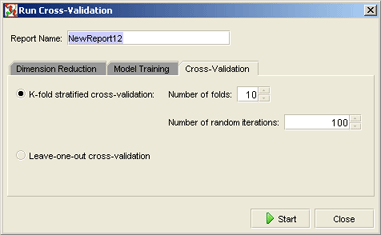
The accuracy of the classification that can be achieved on the training samples with the dimensionality reduction and training parameters you choose can be estimated using cross-validation (see "Cross-Validation Explained" for details). For cross-validation only the training samples from the project are used, because to be able to test the classification accuracy, the correct sample classes must be known.
To start cross-validation click the "Run Cross-Validation" button on the toolbar. The following dialog box will open:
In this dialog you can set a name for the report, that will be created after cross-validation, and the cross-validation parameters as well as the dimension reduction and model training parameters.
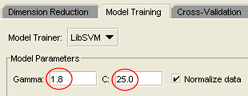
If you previously trained a model with the LibSVM Grid trainer and want to
run cross-validation with the best Gamma and C values found,
make sure that you enter these best Gamma and C values
in the "Model Training" tab of the "Run Cross-Validation" dialog
as the LibSVM trainer parameters:
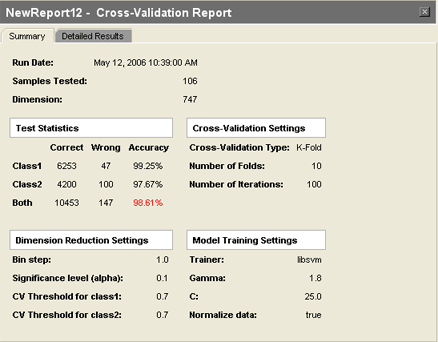
When the cross-validation is finished, a report panel will open, and the estimated accuracy will be displayed in the "Test Statistics" section:
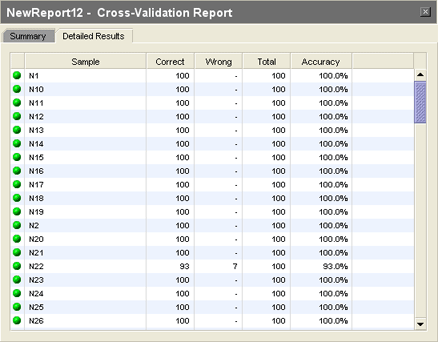
In the "Detailed Results" tab of the report you can find the accuracy estimations and the numbers of the correct and incorrect classifications for every single training sample:
The report is saved in the project, so that later at any time you can find it in the "Reports / Cross-Validation" folder of the project tree.
 See also: